Strategy Comparison
What it is
The LTR / MTR / STR comparison panel on the Deal Workroom, which models a deal three different ways side by side: standard long-term lease (LTR), furnished mid-term rental (MTR), and nightly short-term rental (STR) — see the Glossary for what distinguishes each.
Why / when you'd use it
Useful whenever a property could plausibly work under more than one rental model and you want a real, apples-to-apples comparison rather than a guess about which pays better.
Checking STR regulatory status first
Before the assumption fields, this panel shows a banner with the property's STR regulatory status — Verified allowed, Possibly allowed, Restricted, Not allowed, or Unknown — with a warning note if relevant. Check this before assuming STR is viable; a great STR projection doesn't matter if short-term rentals aren't actually permitted at that address.
Running a comparison
Fill in assumptions for each strategy:
MTR assumptions: Monthly rate, Occupancy %, Avg stay (months), Turnover cost
STR assumptions: Avg nightly rate, Occupancy %, Variable cost/night, Monthly fixed costs
(LTR uses the unit rents already on file — no separate assumptions needed.)
Select Compare strategies:
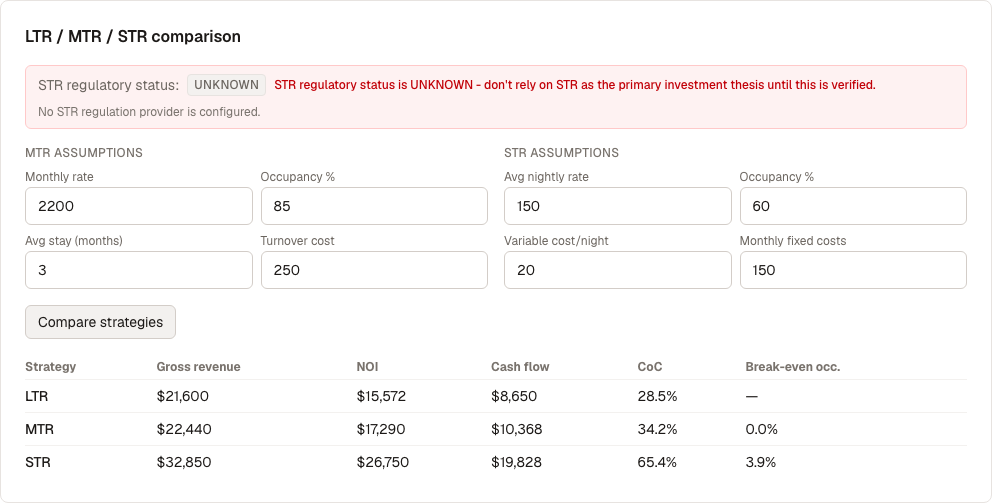
The results table shows Gross revenue, NOI, Cash flow, Cash-on-cash return, and Break-even occupancy for each strategy, so you can see directly which one produces the strongest numbers for this specific property.
What's next
- Model the STR case in more depth, month by month: STR Scenarios (on the property page)
- Check what real market data supports these assumptions: Research