Stress Test & Offer
What it is
Two related tools on the Deal Workroom's Underwriting panel: a stress test, which shows how a deal's numbers hold up under progressively worse conditions, and an offer calculator, which suggests a target price, a suggested offer, and a walk-away ceiling based on your own minimum-return requirements.
Why / when you'd use it
Base-case numbers only tell you how the deal looks if everything goes as planned. The stress test answers "what if it doesn't?" The offer calculator turns your return requirements into an actual number to negotiate around, rather than a gut feeling.
Both require a saved underwriting assumption on the deal's property first — run an Underwriting Analysis before using either.
Running a stress test
Select Run stress test. Brickwise recomputes NOI, cash flow, cap rate, cash-on-cash return, and DSCR under four scenarios (see Scenario in the Glossary):
- BASE — your assumptions as entered
- UPSIDE — more optimistic
- DOWNSIDE — moderately worse rent/expense/vacancy
- SEVERE — significantly worse
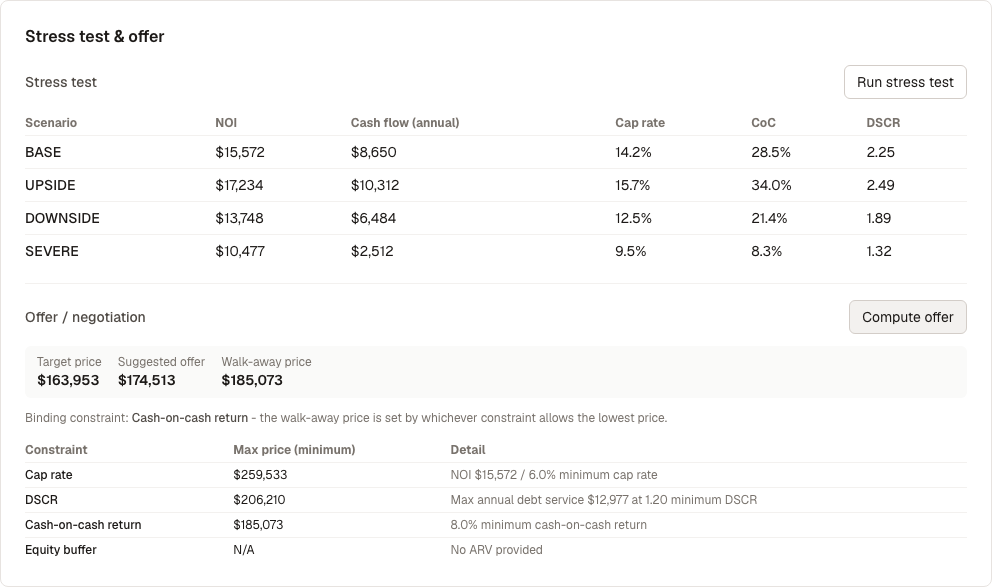
Known UI issue: scenario names appear here as raw text ("BASE", "UPSIDE") rather than the friendlier formatting used elsewhere in the app. See Limits & Expectations.
Use this to see how much room the deal has before it stops working — a deal that only looks good in the Base case is riskier than one that still cash-flows under Downside.
Computing an offer
Select Compute offer. Brickwise checks several independent constraints — minimum cap rate, minimum DSCR, minimum cash-on-cash return, and (where relevant) an equity buffer — and shows:
- Target price — your stated target, if you've set one
- Suggested offer
- Walk-away price — the highest price that still clears every constraint
Below the summary, a table shows every constraint checked and its own maximum price, with the binding constraint (the one actually limiting your offer) called out — see Glossary.
What's next
- See how this deal performs under a different rental strategy: Strategy Comparison